Join for free – Register now

Thinkable

4O01

Thinkable logo

Thinkable is specialized in products for creating tactile diagrams—essential for access to graphical information. The TactiPad drawing board as a basis is extendable with GraphGrid, CircleFrame, TactiForma and Motorised Drawing Arm. Depending on educational, professional or recreational needs.

Kontaktangaben

Thinkable
Scheprad 9
6852 BT Huissen
Netherlands

info@thinkable.nl
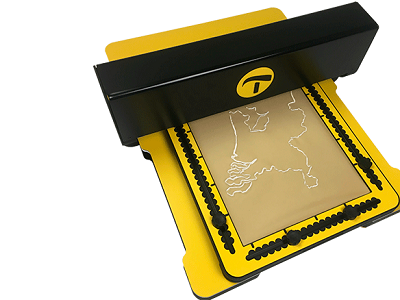
Perspective on an MDA: A yellow flat surface at the bottom bears a slightly smaller yellow TactiPad. Above both, a black bar is hovering. It emits a drawing onto the TactiPad.

Motorized Drawing Arm (MDA)

The MDA is a computer-driven motorised arm that draws tactile graphics from digital templates on the TactiPad Drawing Board. It combines the accuracy of digital graphics with the versatility of drawing by hand. Digital drawing and tactile perception almost works simultaneously with the MDA!

More info on the MAD on our website
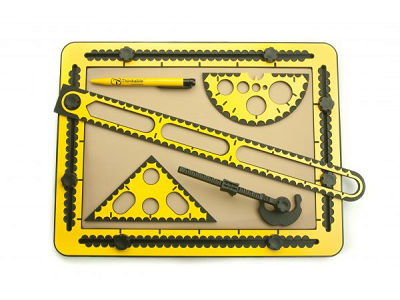
Bird's eye on a TactiPad. Placed on it: pen on the upper left, ruler diagonally, triangle template on lower left, compasses on lower right and angle/arc template on upper right.

TactiPad Drawing Board

TactiPad by Thinkable is a drawing board which enables a VIP to make or perceive a tactile drawing. These drawings are made on a plastic foil. By lightly pressing down on the foil while drawing, the lines raise instantly. Ergonomic design and included drawing tools.

More info on TactiPad on our website
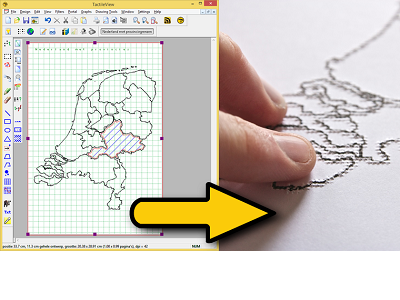
Split image. Left: Screenshot of TactileView software with a map of the Netherlands. Right: Produced braille print of that map with a finger exploring it.

TactileView Drawing Software

The TactileView software by Thinkable creates tactile graphics. Besides the software with easy to use tools, there is an international web catalogue with graphic templates. After designing them on the computer, the images can be printed on a braille embosser or on swell paper (microcapsule paper).

More info on TactileView software on our website
GraphGrid with four tools on top

GraphGrid

Creating drawings based on rows and columns.
Cells become tangible on the TactiPad because rubber bands are placedin a frame. The cells can contain game scores, a table, or form a coordinate system to construct a graph.

More about GraphGrid
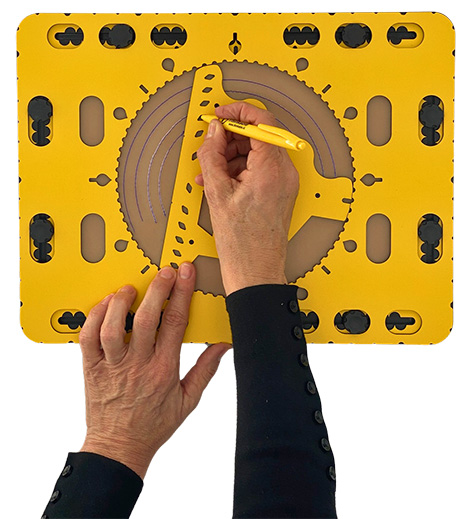
CircleFrame with the Zigzagtool in the middle. Several arches are drawn

CircleFrame

CircleFrame allows you to draw circles—such as mandalas, pie charts, or clocks—on the TactiPad. The central opening lets you rotate the wedge tool and templates 360 degrees and align them with degree markings for patterns and angles.

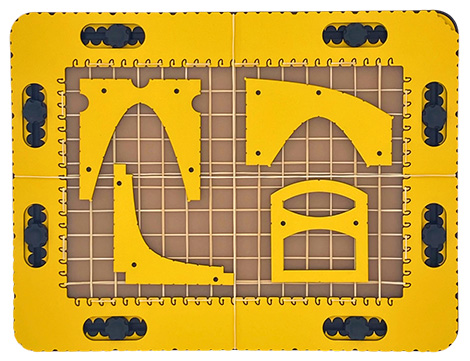
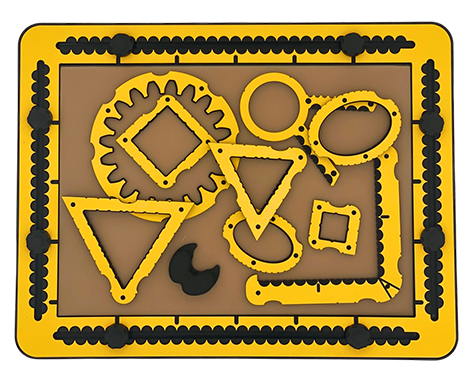
26 Tactiforma tool spread over TactiPad

TactiForma

26 tools on the TactiPad create precise basic shapes (e.g., rectangles, triangles, squares, ellipses, gears, polygons) without the need for measurement. Fast and accurate for professionals, with the ability to combine shapes into 3D design.


Note
The exhibitor is solely responsible for the content of the exhibitor presentation both on the organizer’s website and on the website of the respective exhibitor. The organizer assumes no responsibility or liability whatsoever.

Cookie Consent with Real Cookie Banner